[Java] Socket
간단한 소켓 통신을 통해 서버와 클라이언트 간의 채팅을 구현하는 예제를 통해 공부를 해보았다. 까먹지 않기 위해 기록 기록….👀
package com.example.test;

import java.io.BufferedReader;
import java.io.InputStreamReader;
import java.io.OutputStreamWriter;
import java.io.PrintWriter;
import java.net.ServerSocket;
import java.net.Socket;
import java.util.Iterator;
import java.util.Vector;

class Server extends Thread {
    /*
    Server class
    서버 역할을 하는 클래스. 클라이언트의 연결을 기다리고 연결된 클라이언트들에 대한 처리를 담당함.
     */

    Vector<ClientHandler> clientList = new Vector<>();

    /*
    Vector는 자바에서 제공하는 동기화된 컬렉션 클래스 중 하나로 스레드 간에 안전하게 사용할 수 있도록 동기화 돼 있음.
    Vector는 배열과 유사하지만 크기가 동적으로 조절되며 동기화가 보장되기 때문에 여러 스레드에서 안전하게 사용할 수 있다.

    서버에 연결된 각 클라이언트를 나타내는 클래스인 ClientHandler 객체를 담는 Vector를 생성한다.
    Vector를 사용하는 이유는 다수의 클라이언트가 동시에 서버에 연결되고 서로 다른 스레드에서 이 벡터를 조작할 수 있기 때문에
    동기화된 자료 구조를 사용해 스레드 안전성을 보장하려는 목적이다.

     */

    ServerSocket ss;
    boolean running = true;

    public void run() { // 스레드가 실행할 코드를 정의하는 메서드. 안의 로직은 스레드가 시작되면 실행 됨.
        try {
            ss = new ServerSocket(8090); // ServerSocket 객체를 생성하여 클라이언트의 연결을 수락할 준비
            // new ServerSocket(0) 시스템에서 사용 가능한 포트를 자동으로 할당
            System.out.println("Server running on port: " + ss.getLocalPort());
            while (running && !Thread.currentThread().isInterrupted()) {
                System.out.println("Waiting client...");
                Socket s = ss.accept(); // accept()을 호출, 클라이언트가 연결 요청을 할 때까지 블록됨.

                /**
                 *    public Socket accept() throws IOException {
                 *         if (isClosed()) // 소켓이 닫혔는가?
                 *             throw new SocketException("Socket is closed");
                 *         if (!isBound()) // 소켓이 바인딩 되었는가? ==> 클라이언트의 연결을 수락할 준비가 되었는가?
                 *             throw new SocketException("Socket is not bound yet");
                 *         Socket s = new Socket((SocketImpl) null);
                 *         implAccept(s);
                 *         return s;
                 *     }
                 *   ==> ServerSocket 에서 제공되는 메서드로 클라이언트와의 실제 연결이 수락되면 클라이언트와 통신할 수 있는 Socket객체를 반환함.
                 *         연결 요청이 없는 경우에는 블록되어 대기,
                 */

                // 클라이언트가 연결을 시도하면 `accept`는 해당 클라이언트와 통신할 수 있는 Socket 객체를 반환한다.
                System.out.println("Client connected.");

                /*
                this는 현재 Server 객체를 가르킨다.
                ClientHandler가 생성자에서 this를 사용하는 이유는 새로운 클라이언트가 서버에 연결되었을 때,
                이 클라이언트와 관련된 작업을 Server 객체의 메서드 등을 통해 수행하기 위함이다.
                ==> 즉, 생성자를 통해 'Server' 객체를 전달받아 'ClientHandler' 객체가 해당 서버의 기능을 활용할 수 있는 것.
                    서버와 클라이언트 간의 통신을 관리하고 다른 클라이언트에게 메시지를 브로드캐스팅하는 등의 작업을
                    'Server'객체의 메서드를 호출하여 수행할 수 있음.
                 */
                ClientHandler client = new ClientHandler(this, s);
                /*
                클라이언트와의 연결이 수락되면 `ClientHandler` 클래스의 인스턴스를 생성하고,
                clientList에 이 클라이언트 핸들러를 추가한다.
                */
                clientList.add(client);
                /*
                client의 start()는 ClientHandler의 메서드가 아니라 Thread의 메서드이다.
                ClientHandler는 Thread를 상속받았기 때문에 start()를 실행할 수 있는 것.

                public void start() {
                    synchronized (this) {
                        // zero status corresponds to state "NEW".
                        if (holder.threadStatus != 0)
                            throw new IllegalThreadStateException();
                        start0();
                    }
                }

                ==> start()는 스레드를 시작하는 역할을 한다.
                start()를 호출하면 새로운 스레드가 생성되어 비동기적으로 실행된다.
                한번 스레드가 시작되면 다시 시작할 수 없으며, 이미 시작된 스레드를 다시 시작하려고 하면 IllegalThreadStateException가 발생함.
                synchronized (this)는 여러 스레드가 동시에 start()를 호출하지 못하도록 동기화를 제공함.
                start0() 메서드가 호출되기 전에 synchronized (this) 블록 내에서 현재 스레드의 상태를 확인하고, 이미 시작된 스레드인지 확인함.
                start0() 메서드는 실제로 네이티브 코드로 작성된 메서드로 스레드를 시작하는 로우 레벨의 작업을 수행한다.

                해당 클라이언트와의 통신을 담당할 새로운 스레드로 시작하는 시점은 start()할 때임!!!!!!!!!!
                start() ==> start0() ==> Thread를 상속받은 ClientHandler의 run() ==>
                 */
                client.start();
            }
        } catch (Exception e) {
            System.out.println("Server - error occurred. system will be down.");
            System.out.println("Error in ClientHandler.run(): " + e.getMessage());
            shutdown();
            /*
            예외가 발생하면 해당 예외를 캐치하고 오류 메시지를 출력한다.
            그 후 shutdown 메서드를 호출하여 서버 및 클라이언트의 연결을 종료함.
            */
        }
    }

    void shutdown() {
        this.running = false;
        Iterator<ClientHandler> it = clientList.iterator();
        while (it.hasNext()) {
            ClientHandler client = it.next();
            client.disconnect();
            it.remove();
        }
        if (ss != null) try { ss.close(); } catch (Exception e) {}
    }

    void broadcast(String s) {
        for (ClientHandler client : clientList) {
            client.sendMessage(s);
        }
    }

}

class ClientHandler extends Thread {

    Server server;
    boolean running = true;
    Socket socket;
    BufferedReader in;
    PrintWriter out;

    public ClientHandler(Server server, Socket s) throws Exception {
        this.server = server;
        this.socket = s;
    }

    void disconnect() {
        System.out.println("ClientHandler.disconnect()");
        running = false;
        if (in != null) try { in.close(); } catch (Exception e) {}
        if (out != null) try { out.close(); } catch (Exception e) {}
        server.clientList.remove(this);
    }

    // sendMessage()는 서버에서 모든 클라이언트에게 메시지를 전송하는 역할을 함.
    void sendMessage(String msg) {
        out.println(msg);
        out.flush();
    }

    public void run() {
        try {
            System.out.println("ClientHandler.run()");
            // 클라이언트와의 연결된 소켓에서 출력 스트림을 얻어온다.
            out = new PrintWriter(new OutputStreamWriter(socket.getOutputStream()));
            // 클라이언트와의 연결된 소켓에서 입력 스트림을 얻어온다.
            in = new BufferedReader(new InputStreamReader(socket.getInputStream()));
            out.println("Welcome!");
            out.flush(); // 버퍼에 남아있는 모든 데이터를 비워줘야함. 안비우면 메시지 출력 안 될 수도 있음.
        } catch (Exception e) {
            System.out.println("error occurred.");
            e.printStackTrace();
        }

        while (running && !Thread.currentThread().isInterrupted()) { // 클라이언트가 계속해서 연결중이라면?
            try {
                String line = in.readLine(); // 입력 받아서
                System.out.println("message received - " + line); // 출력
                if ("exit".equals(line)) { // 만약에 exit를 입력했다면 break하고 disconnet() 호출
                    // ==> 해당 클라이언트의 ClientHandler 스레드가 종료되고, 클라이언트와 서버와의 연결 끊어짐
                    break;
                }
                if ("down".equals(line)) { // down을 입력했다면 shutdown() ==> disconnet() 호출
                    server.shutdown(); // exception
                    // ==> 전체 서버 종료, 당연히 ClientHandler 스레드도 종료
                    break;
                }

                // 만약 exit와 down 외의 입력값이 들어온다면 broadcast()로 클라이언트가 입력한 값을 파라미터로 보냄
                server.broadcast(line);
            } catch (Exception e) {
                System.out.println("error occurred. connection will be closed.");
                e.printStackTrace();
                break;
            }
        }
        disconnect();
    }

}

class ConsoleClient extends Thread {

    boolean running = true;
    Socket socket;
    BufferedReader in;
    PrintWriter out;
    ConsoleReader console;

    public ConsoleClient() throws Exception {
        this.socket = new Socket("localhost", 8090);
        this.console = new ConsoleReader(this);
        this.console.start();
    }

    void sendMessage(String message) {
        System.out.println("ConsoleClient.sendMessage: " + message);
        out.println(message);
        out.flush();
    }

    void disconnect() {
        System.out.println("ConsoleClient.disconnect()");
        running = false;
        if (in != null) try { in.close(); } catch (Exception e) {}
        if (out != null) try { out.close(); } catch (Exception e) {}
        console.shutdown();
    }

    public void run() {
        System.out.println("ConsoleClient.run()");
        try {
            in = new BufferedReader(new InputStreamReader(socket.getInputStream()));
            out = new PrintWriter(new OutputStreamWriter(socket.getOutputStream()));
        } catch (Exception e) {
            System.out.println("error occurred.");
            e.printStackTrace();
            running = false;
        }
        System.out.println("stream created.");
        while (running && !Thread.currentThread().isInterrupted()) {
            try {
                String line = in.readLine();
                if (line == null) {
                    disconnect();
                    break;
                }
                System.out.println(line);
            } catch (Exception e) {
                System.out.println("ConsoleClient - error occurred. system will be down.");
                System.out.println("Error in ClientHandler.run(): " + e.getMessage());
                e.printStackTrace();
                running = false;
                break;
            }
        }
    }

}

class ConsoleReader extends Thread {
    ConsoleClient cc;
    boolean running = true;
    ConsoleReader(ConsoleClient cc) {
        this.cc = cc;
    }
    void shutdown() {
        running = false;
        this.interrupt();
    }
    public void run() {
        System.out.println("ConsoleReader.run()");
        BufferedReader in = new BufferedReader(new InputStreamReader(System.in));
        try {
            while (running
                    && !Thread.currentThread().isInterrupted()) {
                System.out.print("input: ");
                String line = in.readLine();
                if (line == null) {
                    running = false;
                    cc.disconnect();
                    break;
                }
                System.out.println("> " + line);
                cc.sendMessage(line);
            }
        } catch (Exception e) {
            System.out.println("Error in ConsoleReader.run(): " + e.getMessage());
            e.printStackTrace();
        }
    }
}

public class SocketTest {
    public static void main(String[] args) throws Exception {
        if (args.length > 0) {
            if ("server".equals(args[0])) {
                new Server().start();
            } else if ("client".equals(args[0])) {
                new ConsoleClient().start();
            }
        } else {
            System.out.println("사용법: java SocketTest <server/client>");
        }
    }
}
Server Class 클래스:
-
Server클래스는 서버 역할을 하는 클래스로, 클라이언트의 연결을 기다리고 연결된 클라이언트들에 대한 처리를 담당한다. -
서버는
ServerSocket을 사용하여 run()에 특정 포트(여기서는 8088)에서 클라이언트의 연결을 수락한다.==> 무한 루프인 이유는 여러 클라이언트의 연결을 관리하기 위함임.
-
Server클래스는ClientHandler스레드를 생성하여 클라이언트와의 통신을 처리한다.
ClientHandler 클래스:
ClientHandler클래스는 각 클라이언트의 통신을 처리하는 스레드이다.- 각 클라이언트와의 입출력 스트림을 생성하고, 클라이언트로부터 메시지를 수신하여 서버에 브로드캐스팅한다.
- 클라이언트가 “exit”을 보내면 해당 클라이언트의 스레드를 종료하고 연결을 닫는다.
- “down”을 받으면 서버를 종료시키고 클라이언트 연결도 종료한다.
ConsoleClient 및 ConsoleReader 클래스:
ConsoleClient클래스는 클라이언트 역할을 하는 클래스로, 서버에 연결하여 콘솔에서 메시지를 입력하고 서버로 전송한다.ConsoleReader클래스는 콘솔에서 입력을 읽어와서 서버로 전송하는 역할을 하는 스레드이다.
SocketTest 클래스 (메인 클래스):
SocketTest클래스는 프로그램의 진입점으로, 명령행 매개변수에 따라 서버 또는 클라이언트 역할을 수행한다.- “server”를 인자로 주면 서버로 동작하고, “client”를 인자로 주면 클라이언트로 동작한다.
✏️SocketTest 클래스의 프로세스에 대한 순서
-
프로그램 실행:
- 프로그램을 실행할 때 명령행 인자로 “server” 또는 “client”를 전달한다.
-
“server”를 인자로 주면 서버로 동작하며, “client”를 인자로 주면 클라이언트로 동작한다.


-
서버 동작:
- “server”를 명령행 인자로 받았을 경우,
Server클래스의 인스턴스를 생성하고 스레드로 시작한다. Server클래스는ServerSocket을 사용하여 클라이언트의 연결을 기다리고, 연결되면ClientHandler스레드를 생성하여 해당 클라이언트와의 통신을 담당한다.- 서버는 브로드캐스팅을 통해 연결된 모든 클라이언트에게 메시지를 전송한다.
- “down” 메시지를 받으면 서버를 종료하고 클라이언트 연결도 종료한다.
- “server”를 명령행 인자로 받았을 경우,
-
클라이언트 동작:
- “client”를 명령행 인자로 받았을 경우,
ConsoleClient클래스의 인스턴스를 생성하고 스레드로 시작한다. ConsoleClient클래스는 서버에 소켓 연결을 시도하고, 연결이 성공하면ConsoleReader스레드를 생성하여 사용자의 콘솔 입력을 읽어와 서버로 전송한다.- 서버에서 받은 메시지를 화면에 출력한다.
- “exit” 메시지를 입력하면 클라이언트 프로그램을 종료한다.
- “client”를 명령행 인자로 받았을 경우,
-
통신 프로세스:
- 클라이언트에서 서버로 메시지를 전송할 때는
ConsoleClient의sendMessage메서드를 사용한다. - 서버는 받은 메시지를 모든 클라이언트에게 브로드캐스팅한다.
- 서버에서 “exit” 메시지를 받으면 해당 클라이언트와의 연결을 종료하고, “down” 메시지를 받으면 서버와 모든 클라이언트의 연결을 종료한다.
✏️ 로컬에서 테스트를 진행해보자
-
SocketTest.java가 있는 디렉토리에서 cmd창을 연다. ==> 아래 명령어를 실행함. D:\workspace_inteliJ\test\src\main\java\com\example\test>javac -encoding UTF-8 -d . SocketTest.java 나같은 경우에는 encoding 오류가 나서 -encoding UTF-8 옵션을 주고 컴파일을 함. 컴파일하고나면 class파일이 생성될 것.
-
아래 사진처럼 -cp를 사용하여 클래스 패스 위치를 설정(JVM이 클래스 파일 및 라이브러리 파일을 검색하는 경로를 지정)해줌과 동시에 SocketTest 클래스에 인자인 ‘server’ 전달, 실행한다. 다른 cmd창을 켜서 같은 방법으로 client도 실행함.

-
client 창에서 메시지를 입력하면 server cmd창에 그대로 broadcast된다.
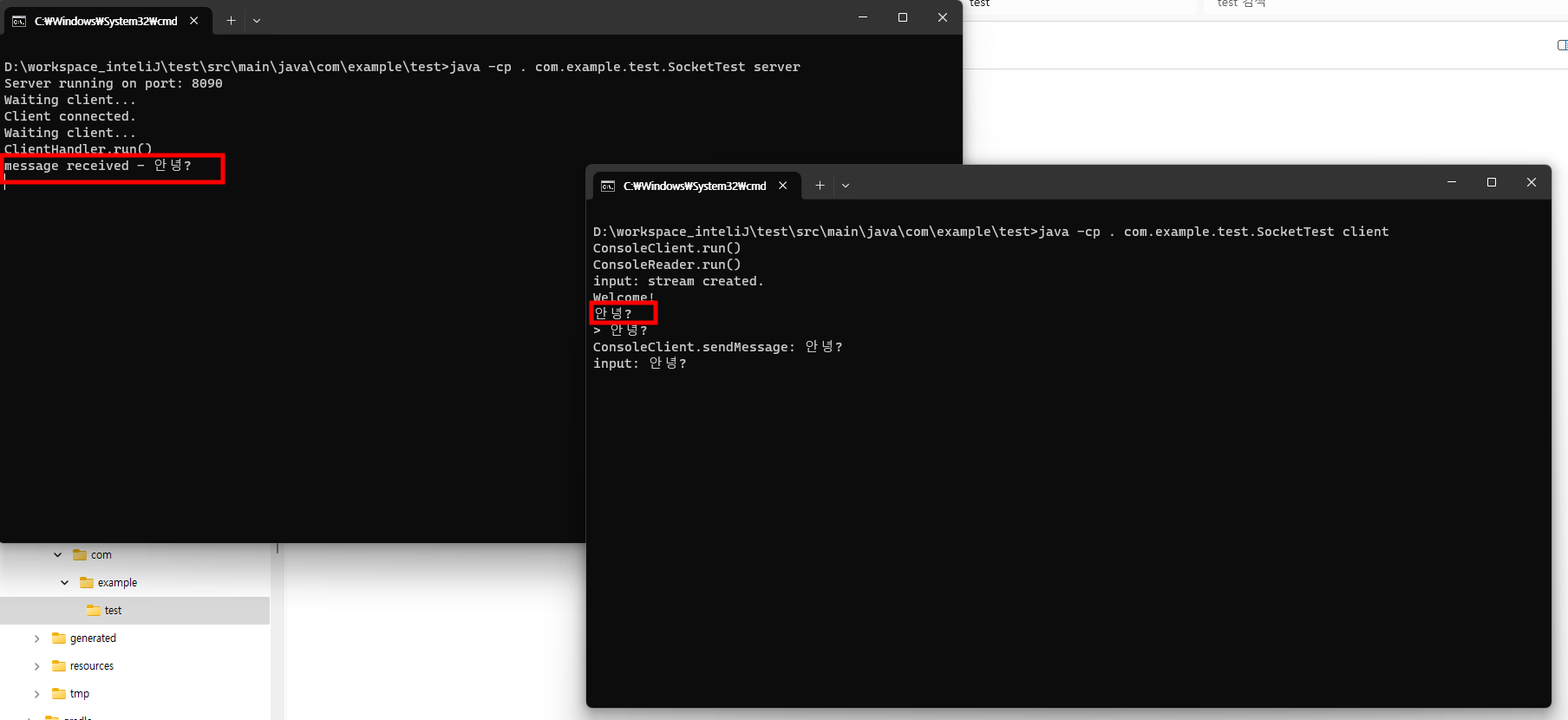
- 클라이언트에서 서버로 메시지를 전송할 때는